
Organizers · coaches · clubs · communities
Registration for workouts, seminars and webinars — no spreadsheets, no thumbs-up in a chat
Publish an event in a couple of minutes and share a short link. PaceTrack keeps the seat limit, confirms guests’ email, reminds participants and opens the online room.
Publishing is free for now. Participants don’t need an account — a name and an email are enough.
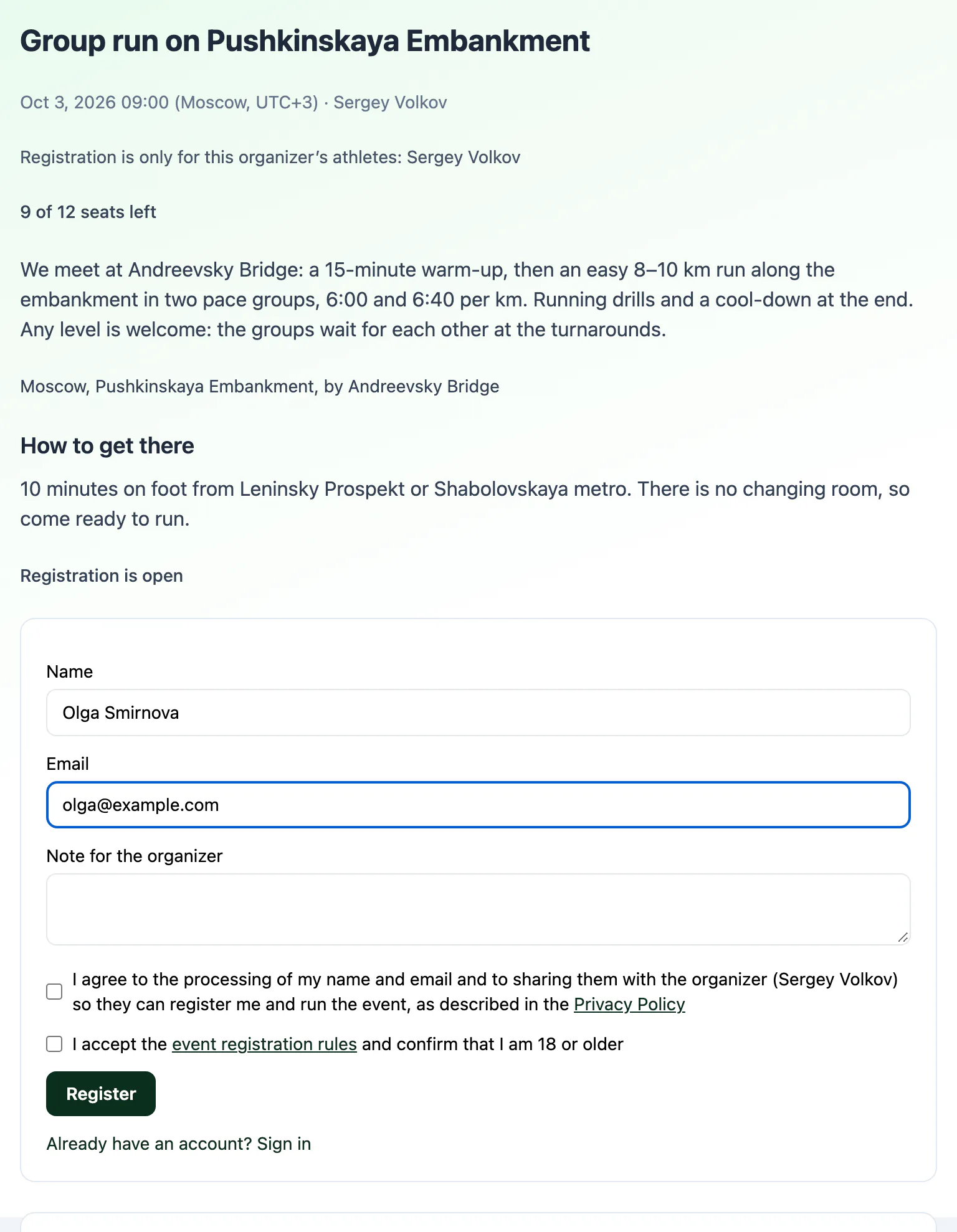
How a guest sees the event page: date and place, “9 of 12 seats left” and registration by name and email.
A couple of minutes
from an empty form to a page with registration
Free
publishing and registration — for now
Up to 10,000
seats per event
No account
guests register by email
Who it is for
Anyone who brings people together for sport — from a morning run to a training camp or a lecture.
Coaches
Group workouts, camps and webinars. For your own athletes or for everyone who doesn’t know you yet.
Clubs
A club schedule with a host for every session, and trial workouts people find by city.
Running communities
A long run together, track intervals, a trip to a race — members only or open to all.
Event organizers
Seminars, lectures, workshops, open sessions by shops and schools, club runs.
Why you need it
Getting people together is easy. The hard part is knowing how many will come — and not writing the same thing to each of them.
01 · Registration
Twenty thumbs-up in the chat — and no idea how many will show up
A thumbs-up means nothing: half don’t come, someone brings friends, and the track has only six lanes.
What PaceTrack does
- Seat limit — from 1 to 10,000, or none. PaceTrack closes registration when the seats run out.
- Guests confirm their email. The seat is held until the person follows the link in the message.
- “9 of 12 seats left” — show the remaining seats or just “Seats available”.
- Registration window and cancellation deadline — when registration opens and closes, and until when a participant can cancel.
02 · Reminders
On the morning of the event I answer everyone: where, when and what to bring
People ask for the address again, mix up the time, and not everyone hears about a change. You run a help desk instead of preparing the session.
What PaceTrack does
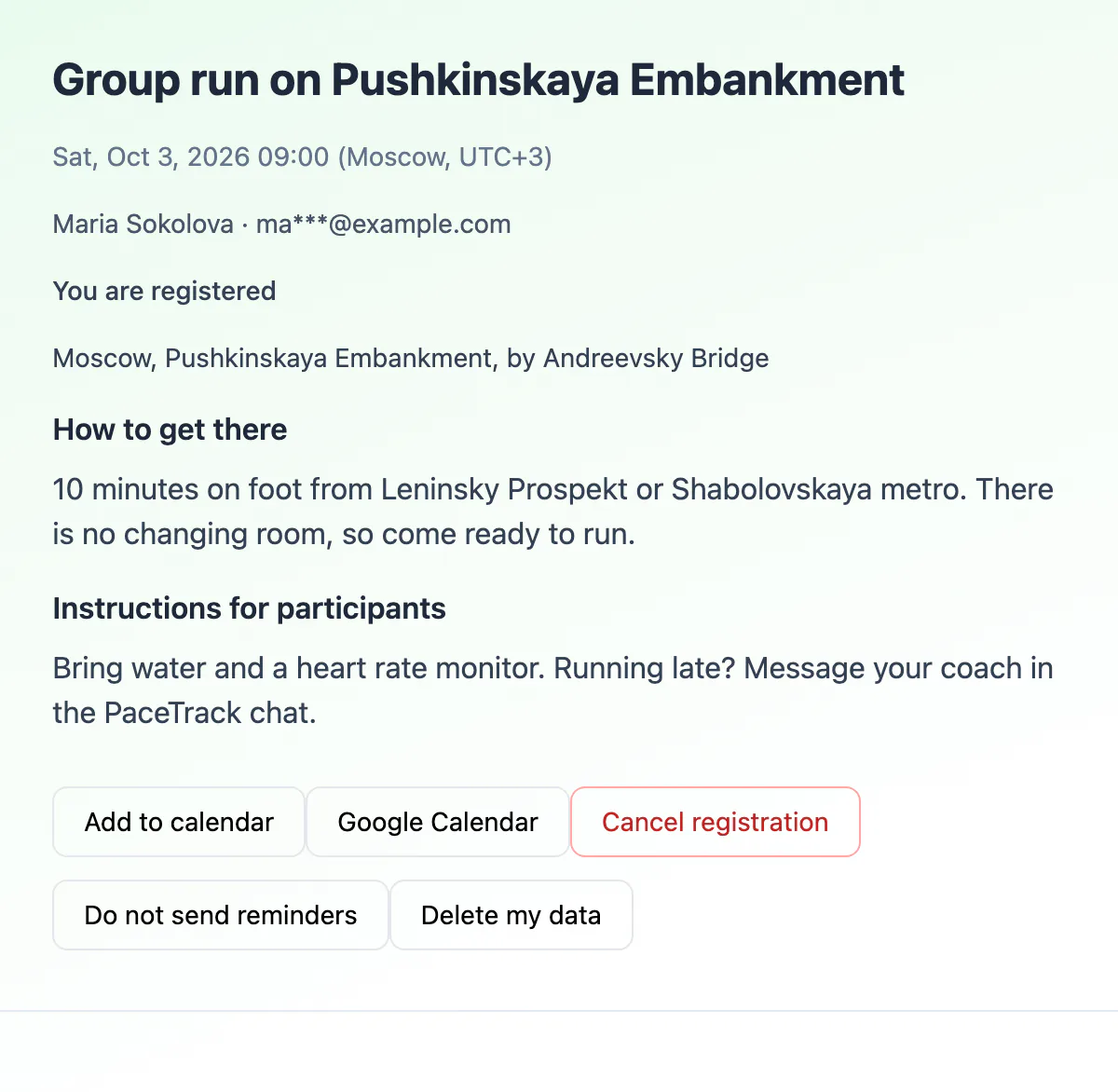
- An email and a personal registration page — time, place, directions and your instructions in one spot.
- A calendar file and a Google Calendar button.
- A reminder a day before, and for online events one more an hour before — with the join link.
- Changes and cancellations — participants get an email without your messages in a chat.
03 · Online
A webinar needs yet another service, and the link wanders around chats
A separate conferencing subscription, a separate attendee list — and people who never registered turn up.
What PaceTrack does
- PaceTrack room — a video meeting right in the browser, nothing to install.
- Only registered participants get the join link. The room opens 30 minutes before the start.
- Your own conference — add an external link or send it later.
- Time zones — everyone sees an online event in their own time, an in-person one in the venue’s time.
04 · Regular sessions
Every week I set up the same workout all over again
Intervals on Tuesdays, a long run on Saturdays: the text is the same, only the date changes. All season long.
What PaceTrack does
- Weekly series — pick the weekdays and the end: until a date, a set number of times, or open-ended.
- Separate registration for each session — you see how many are coming this particular Tuesday.
- A series page listing all sessions; in the catalog a series is a single card.
- “Duplicate” — a one-off event is copied to a draft, dated to the next same weekday.
05 · New people
Only those already in the chat know about my sessions
There is nowhere to post a trial workout so that someone from your city who doesn’t know you can find it.
What PaceTrack does
- An open catalog — list and calendar views, search, filters by city, format and dates.
- Search engines find the pages. If an event isn’t for everyone, keep it available by link only.
- A short link like event.pacetrack.cc/… — for social media, chats and your club’s website.
- Yours or everyone — registration is open to anyone, or only to your athletes, club athletes or group members.
06 · After the event
Who registered and didn’t come stays only in my memory
Without a list you can’t tell whom to write to afterwards, or whether to book a bigger venue next time.
What PaceTrack does
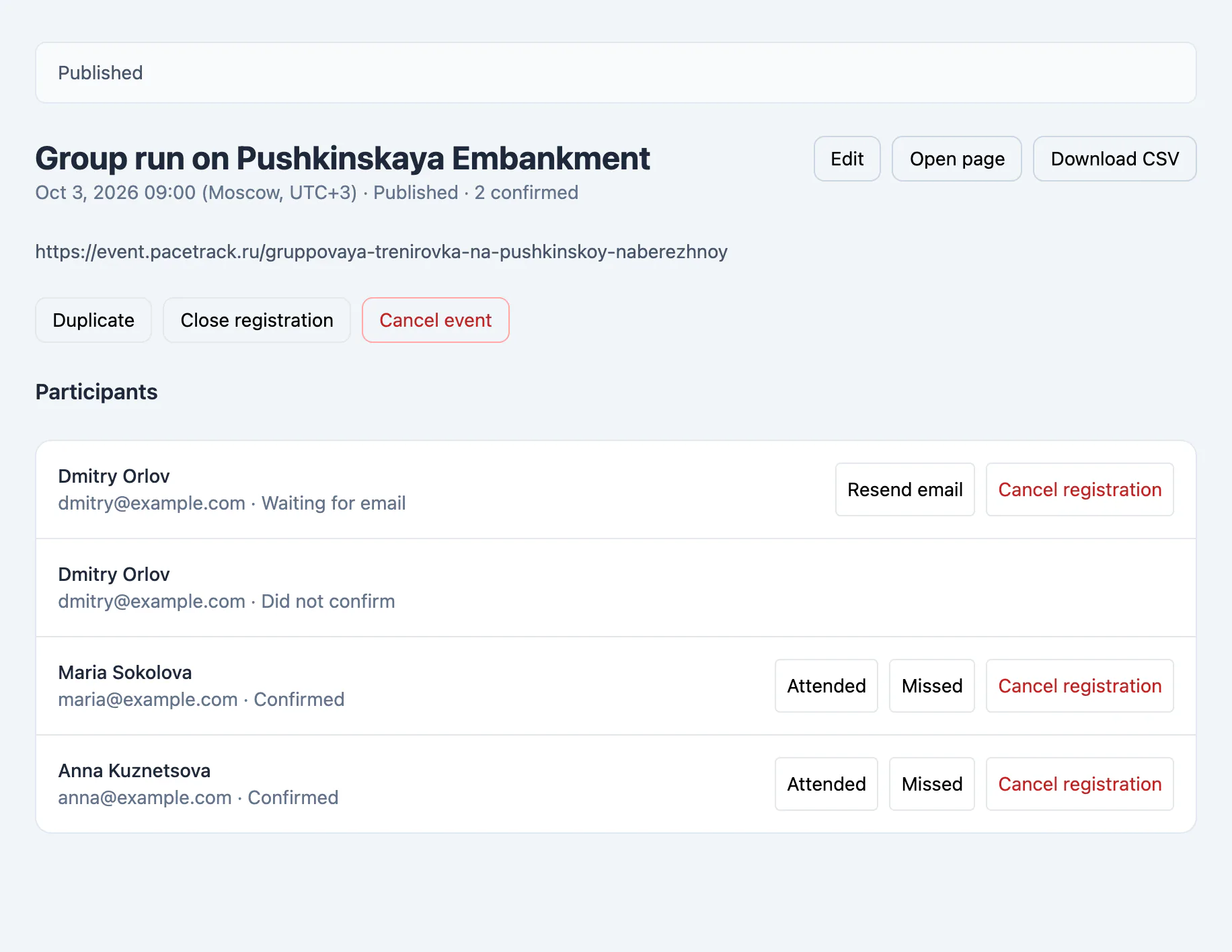
- Attendance — “Attended” and “No-show” marks for every participant.
- CSV export — name, email, status, the participant’s note and registration date. Opens in Excel.
- Notifications for the organizer — a new registration, a cancellation, “seats ran out”: in the app, by email, push and Telegram.
How it works
Six steps from signing up to the list of those who came.
01
Set up an account
Events are published from a coach, club or group account. If you run events but coach no one, a coach account works: you don’t have to add athletes to it.
- Coach or organizer — menu “Community → Events”.
- Club — all club coaches run events as equals, and every session has its own host.
- Athlete group — the founder and moderators publish events.
02
Describe the event
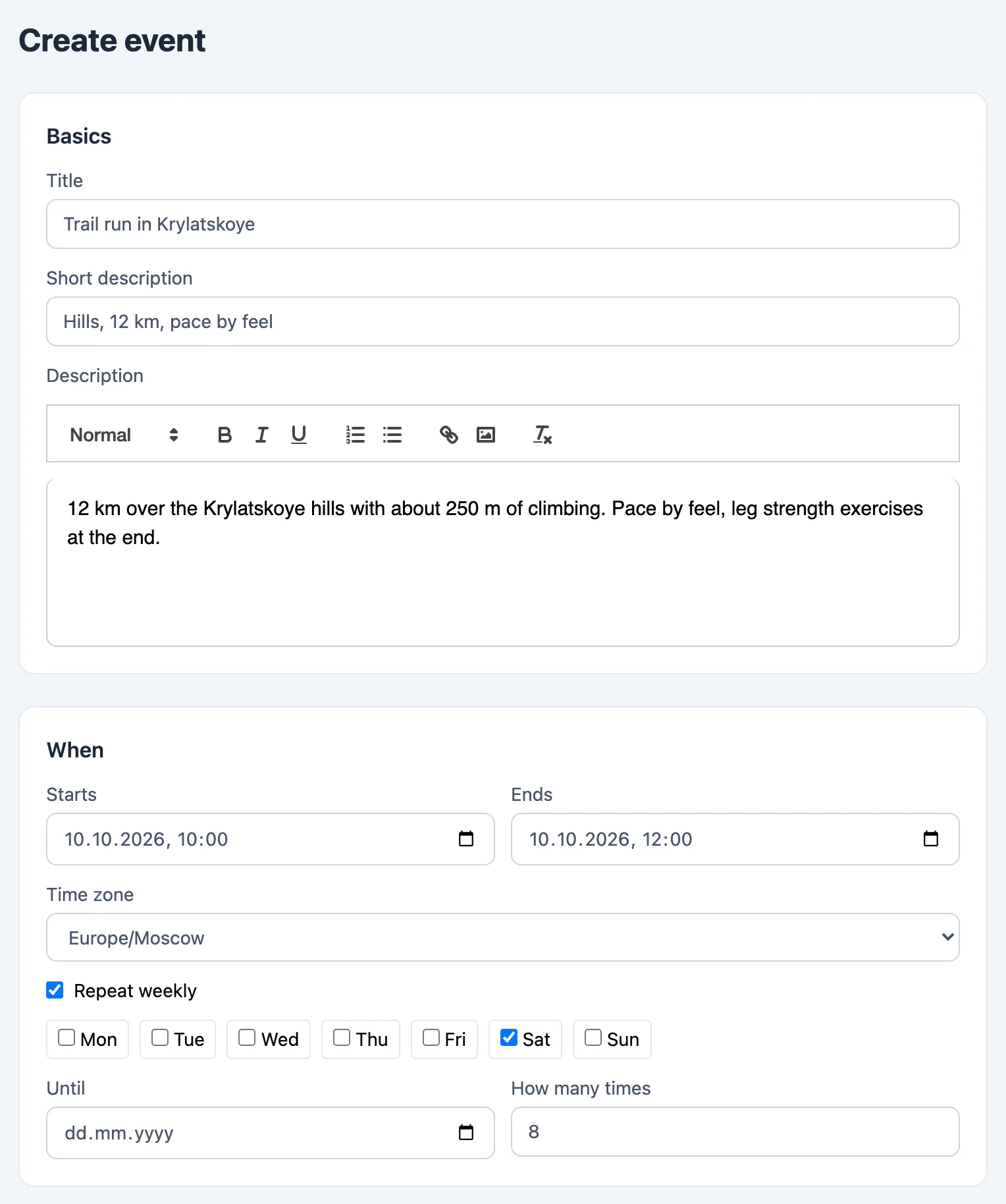
A title, a short description and the full text with images. Start and end, the venue’s time zone. For regular sessions tick “Repeat weekly”.
03
Set up registration
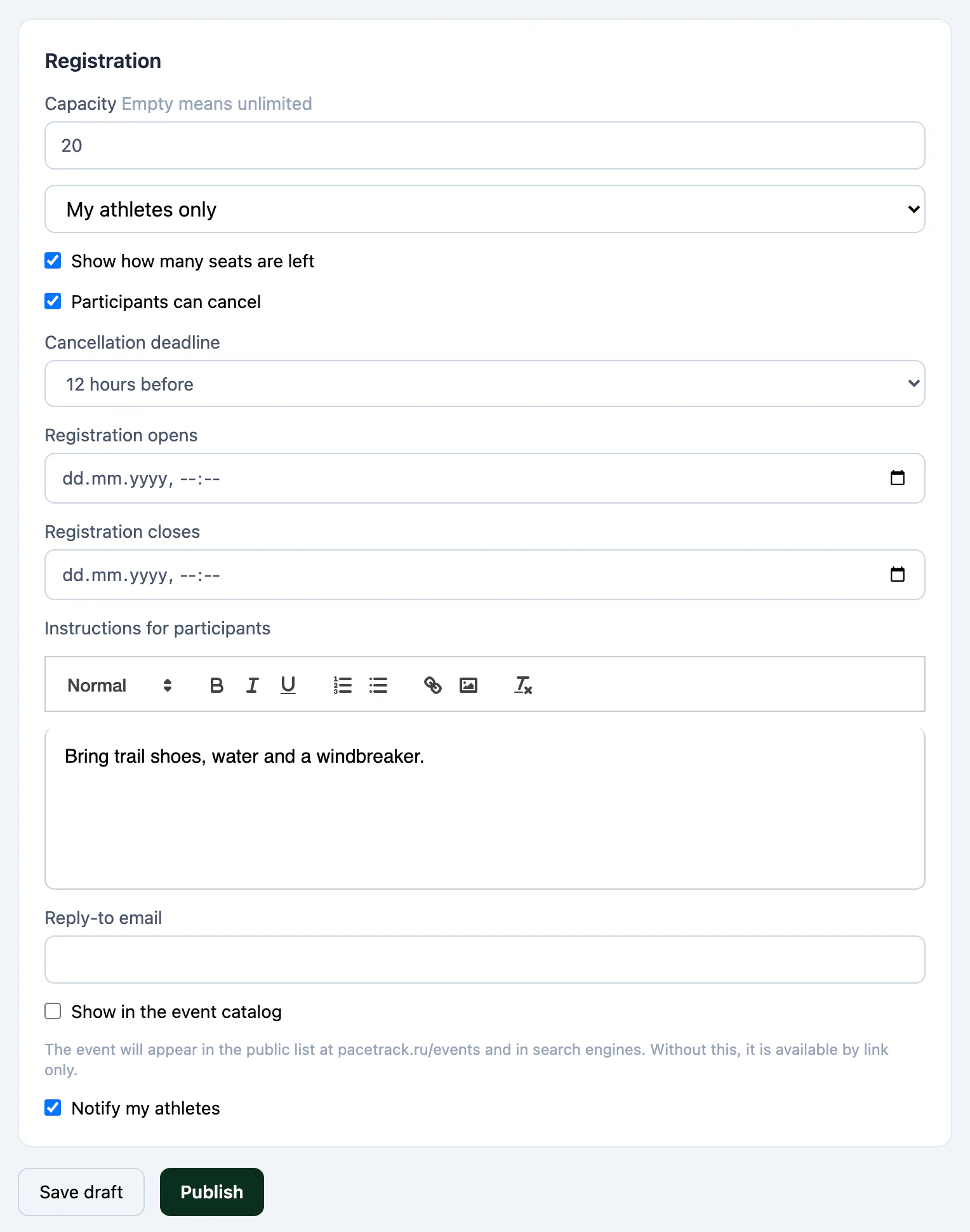
Format — online, in person or other. Seat limit, who can register, cancellation deadline, instructions only registered participants will see. An in-person event can show the exact address to participants only.
04
Publish and share the link
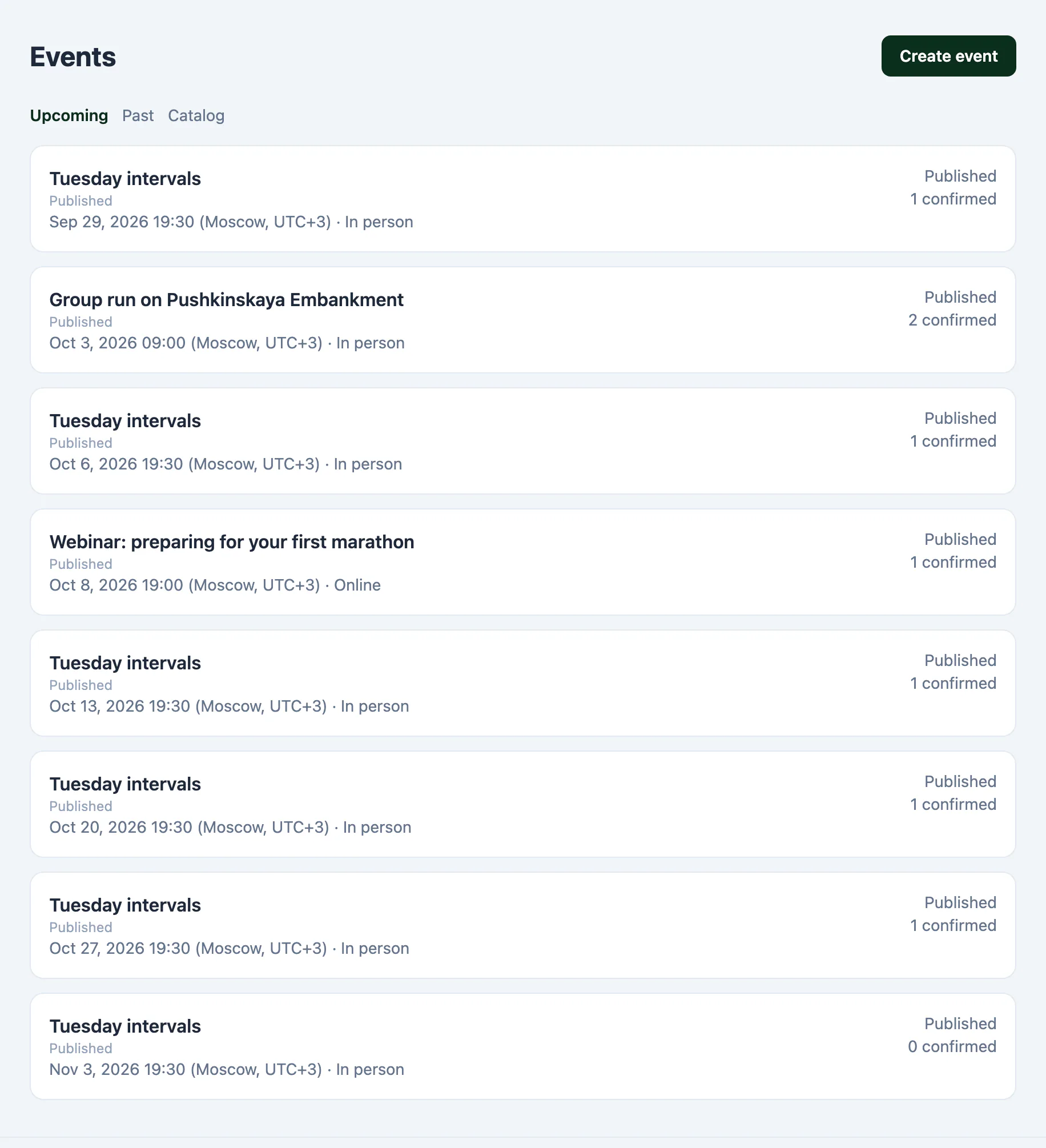
The text is checked automatically — usually in under a minute. Then the event appears in the catalog and you have a short link. One checkbox notifies your own athletes.
05
Participants register themselves
With a PaceTrack account — in one click. Without one — by name and email. Everyone gets an email and a personal page: calendar, online room entry, cancellation.
06
Keep the list and attendance
The event card lists participants with statuses, “Attended” and “No-show” buttons, resending the email to a guest, cancelling a registration and CSV export. From here you can also close, cancel or duplicate the event.
What else matters
The small things that usually force you to keep a separate spreadsheet.
Address for participants only
The page shows the city, while the exact address and directions go to those who registered.
Emails in the participant’s language
The confirmation and reminders arrive in the language the person registered in.
Replies go to you
Set a reply-to email and participants’ answers to event emails will reach you.
Edits without confusion
Changed the time or place? Tick “Notify participants” and everyone gets an email.
Text check
The title and description are checked automatically. If something is wrong, you see which field to fix.
Participants’ data
A guest consents to data processing and can delete their data with one button on the registration page.
What PaceTrack doesn’t do
- It doesn’t take payment for participation. An event can be paid, but settling with participants is on your side.
- It doesn’t issue bib numbers or keep results. This is registration and reminders, not timing.
- It doesn’t publish just anything. Publishing rules apply; a title can’t contain links, phone numbers or emails.
- There are limits: up to 50 new events a day and up to 200 upcoming published ones.
What it costs
Publishing events is free for now, and participants pay PaceTrack nothing. A coach account with three athletes is also free with no time limit, and your first athlete group is free.
All prices and terms →Frequently asked questions
I’m not a coach. Can I publish events? +
Yes. Sign up with a coach account — you don’t have to add athletes to it. In “Community → Events” you create seminars, lectures and open sessions and take registrations for them.
Do participants need a PaceTrack account? +
No. A guest enters a name and an email and confirms the registration via the link in the message. The seat is held until confirmation: no longer than a day and no later than 15 minutes before the start. People with an account don’t need to confirm their email.
Can I run a paid event? +
You can, but PaceTrack doesn’t take the payment. State the terms in the description and settle with participants yourself. The organizer is responsible for running the event, its program and payments.
Will it work for a race? +
For a club run or a small race without fees and bibs — yes: up to 10,000 seats, with the limit and reminders working the same way. PaceTrack doesn’t handle bib numbers, timing or results. The race itself can be added separately to the race calendar.
How do I make a session for my own people only? +
Choose the audience “Only my athletes” — your athletes, club athletes or group members will be able to register. And if you untick the catalog option, the event opens by link only.
What happens if I move or cancel the event? +
On cancellation every participant gets an email. When the time or place changes, tick “Notify participants about the changes” and everyone registered gets a message. In a series you can cancel one session or all future ones.
How does the online room work? +
It is a video meeting in the browser, with nothing to install. Participants enter with a button on their registration page: the room opens 30 minutes before the start and closes 30 minutes after the end. You enter from the event card with moderator rights.
Why didn’t the event appear in the catalog straight away? +
After publishing, the text goes through an automatic check — usually under a minute. If the check is unsure, a moderator looks at it. You get a notification with the result; if it is declined, you see which field to fix and why.
Bring people to your first event
Sign up, fill in the form and share the link. The first registrations will reach you as notifications.
Create an eventEvent catalog · Help: events · For coaches · For clubs · For groups